The manual, in full.
Read it before you buy: every chapter, unchanged from what you download.
17 chapters, from the first docker compose up to the production checklist.
1 Introduction
This starter kit is two things: a Laravel 13 + React admin panel that is ready to deploy — accounts, roles, permissions, audit trail, settings, health, a REST API — and a module generator, make:crud, that reads one of your tables and writes the whole module: controller, validation, data table, forms, detail page and tests. A worked example shop — catalog, sales and customers, ten modules it generated — shows what it produces and how to extend it.
What you get
A finished admin panel
Authentication, RBAC, users, roles, permissions, activity log, application settings, notifications and dashboards — built, tested and styled.
A ten-module example shop
Catalog, sales and customers — every module generated by one make:crud command, with query classes, actions, tests and a REST API. The pattern for every table you add.
Every field type
Text, money, enums, dates, files & images, rich text, maps, passwords, JSON, computed columns and more — each with the right UI.
Real relationships
belongsTo, hasMany, hasOne, many-to-many and polymorphic links are detected from foreign keys and wired both ways.
Bilingual interface
Every string in the UI reads from one dictionary — Indonesian and English — so the app never speaks two languages in one toolbar.
Ship-ready
The whole codebase passes static analysis (PHPStan L8), formatting, and a Pest suite that covers every shipped module — including security regression cases.
Who it's for
Agencies and product teams who build data-heavy admin systems — inventory, HR, master data, catalogues, back-office tools — and want to spend their time on business logic, not on re-writing the same table/form/validation code for the hundredth time. The output is plain, readable Laravel and React that your team fully owns and can edit by hand at any point. Design principle The kit is schema-first: your database is the single source of truth. You describe intent with small comments on your columns; the code does the rest. Regenerate any time — hand-edits in developer-owned files are preserved. Chapter 2
2 Technology Stack
Every layer is a current, stable, well-supported technology. The whole platform runs in Docker, so a new machine is productive in minutes.
| Layer | Technology | Why it's here |
|---|---|---|
| Language | PHP 8.5 | Modern types, enums, readonly — every class is strictly typed, PHPStan level 8 |
| Framework | Laravel 13 | The backbone: routing, Eloquent ORM, validation, queues |
| Frontend | React 19 + Inertia 3 + TypeScript | SPA feel with server-driven routing — no separate API to maintain |
| UI | Tailwind CSS 4 + shadcn/ui | Consistent, themeable (light/dark) design system |
| Database | PostgreSQL 18 (MySQL 8.4 and MariaDB 11 also supported) | Case-insensitive search, JSON columns, and CHECK constraints behind every enum. PostgreSQL is what the kit is built on; four features are unavailable on MySQL — see 2.1 |
| Cache / Queue | Redis 8 | Sessions, cache, broadcasting, background jobs |
| Web server | FrankenPHP + Caddy | Modern PHP app server with automatic HTTPS, one process |
| Auth API | Laravel Sanctum | Personal access tokens with scopes for the REST API |
| Tooling | Vite, Pint, PHPStan L8, Pest, Playwright | Build, format, analyse and test — all wired into CI |
2.1 Which database
PostgreSQL is the engine this kit is built on and the one where every feature exists. MySQL 8.4 and MariaDB 11 are supported (the latter is the server apt install mysql-server gives you on Debian and Ubuntu, through the same mysql driver); both run the product — install, migrations, seeders, CRUD, filters, exports, roles, the audit trail, two-factor, the REST API and generated modules. Switching is a commented block in .env plus one extra compose file:
docker compose -f compose.yml -f compose.mysql.yml up -d
compose.yml is a pure PostgreSQL file and is never edited for this — MySQL lives entirely in compose.mysql.yml, which replaces the database service rather than adding to it. A MySQL installation therefore runs one database, not two. ./scripts/dev-init.sh reads DB_CONNECTION from your .env and adds that file on its own, so there is nothing to remember day to day; in production prod-deploy.sh does the same with compose.prod.mysql.yml. Four things do not exist on MySQL. They are absences, not settings: array columns and the filter that reads them; the inet and macaddr column types; trigram search (MySQL gets a plain LIKE — fine on a small table, a full scan on a large one); and reusing the email address of a soft-deleted account, which rests on a partial unique index MySQL does not have.
Both engines are covered by the kit’s own suite on every change: 759 passing on PostgreSQL, 713 on MySQL, zero failing on either. The difference is the tests for the four features above, which are skipped with a stated reason rather than loosened to pass on both. Chapter 3
3 Getting Started
From the zip to a running application in about five minutes.
3.1 Prerequisites
- Docker & Docker Compose v2 — the only hard requirement. PHP, Node, PostgreSQL and Redis all run inside the containers; you install none of them on your machine.
- Git, if you want the project under version control from the first commit — recommended, and assumed below.
On Linux, join the docker group and then start a new login session — group membership is read when a session begins, so it never reaches a shell that is already open:
sudo usermod -aG docker $USER # then log out and back in
Skip it and the first command in 3.4 stops with permission denied while trying to connect to the Docker daemon socket, which reads like a broken kit rather than a missing group. Running the installer with sudo instead works, but leaves the project files owned by root, which will get in your way the first time you edit them.
Podman is not what this kit is tested against. Rootful Podman works once its Docker-compatible socket is enabled; rootless Podman does not, and cannot without editing compose.yml — the containers run as UID 1000, which rootless Podman maps to a different user on the host, so the dependencies cannot be written during install.
3.2 Unpack it
Unzip the kit into the folder you want the project to live in, and give it its own environment file:
unzip codebooster-enterprise-kit-*.zip -d my-project
cd my-project
cp .env.example .env
Open .env and set APP_NAME to your project's name. The rest of the defaults work as they are for local development. Renaming later Once the application is running, Settings → Application is the better place: it stores the name in the database, which takes precedence over .env and takes effect immediately, together with the logo, favicon and brand colour. Either way the sidebar, the browser tab, the from-name on outgoing mail and the session cookie all follow — and because the cookie's name is derived from it, renaming signs everyone out. While those settings are empty, BRAND_COLOR, BRAND_LOGO and BRAND_FAVICON in .env supply the brand — useful for a fresh database or a demo that rebuilds itself. Base colour on the same screen (or BRAND_BASE) switches the greys from Zinc to a warm tone; the brand colour then also tints the selected row and the charts. The sign-in screen draws the logo as a faint white silhouette in its panel's corner, so a logo on a transparent background looks best there. Running more than one project on this machine? Each one needs its own host ports and its own Compose project name. Both live in .env: set COMPOSE_PROJECT_NAME, then APP_PORT, VITE_PORT and the *_HOST_PORT block above it — compose.yml does not spell out a single port number, so there is nothing to change there. Do it before the first up — after that, Docker has already created volumes under the old name. APP_URL follows APP_PORT by itself; setting it by hand is how a password-reset link opens the other copy.
3.3 Put it under version control
git init
git add .
git commit -m "Initial commit — CodeBooster Enterprise Kit"
.gitignore already excludes .env, vendor/, node_modules/ and the build output, so the first commit is the source and nothing else.
3.4 Run it
One script builds the containers, runs migrations, seeds demo roles/users and builds the frontend:
cd my-project
make init          # = ./scripts/dev-init.sh
The first run builds the images from scratch and pulls PostgreSQL, Redis and Mailpit, so expect it to take a while — the length depends far more on your machine and connection than on the kit. Every run after that reuses the cache and starts in seconds. If it stops partway with a network or registry error, run the same command again: every step is safe to repeat, and the build is already cached.
make is the front door. A Makefile wraps the docker compose commands you would otherwise type all day: make up, make down, make ps, make logs, make shell, make artisan ARGS="…", make db, make test. Type make on its own for the full list — every target prints the long command it stands for, so nothing is hidden and nothing stops you typing the long form yourself. When something looks off, make doctor checks Docker, .env, host ports taken by another program, the containers and the built assets, and each finding names its fix.
3.5 Ports & URLs
| Service | URL | Purpose |
|---|---|---|
| Application | http://localhost:8002 |
The admin panel |
| Mailpit | http://localhost:8031 |
Catches all outgoing email in dev |
| Adminer | http://localhost:8087 |
Database GUI — opt-in |
| RedisInsight | http://localhost:5540 |
Redis GUI — opt-in |
The two GUIs are opt-in. They sit behind a Compose profile, so dev-init.sh does not start them — three extra images to pull before you have seen the application once, when most developers already have a client they prefer. Start them with make tools (docker compose --profile tools up -d).
Inside Adminer the database host is postgres, port 5432 — the service name, not localhost, which a containerised tool resolves to itself. The Server field is pre-filled for you. From your own machine it is 127.0.0.1 port 5438.
Ports — these are the defaults in compose.yml. Change them there before the first up if something else on your machine already holds one.
3.6 Log in
Three demo accounts are seeded in development (password: password):
| Role | Sees | |
|---|---|---|
[email protected] |
Super Admin | Everything (bypasses all permission checks) |
[email protected] |
Admin | Most modules, per assigned permissions |
[email protected] |
Guest | Read-only sample access |
3.7 Upgrading later
Every release comes with two downloads: the full bundle, for new projects, and an upgrade patch from the previous release, for the project you already have. The patch is built between the two bundles — the files exactly as you received them — and applied as a three-way merge, so a file you never touched is updated, a file you edited elsewhere is merged, and the few places where you and the kit changed the same lines are marked and named for you to resolve.
make upgrade-check ../codebooster-enterprise-kit-1.15.0-to-1.15.1.patch   # what would change
make upgrade ../codebooster-enterprise-kit-1.15.0-to-1.15.1.patch         # apply
make composer install && make npm ci && make migrate && make build
git add -A && git commit -m "Upgrade kit to 1.15.1"
Modules you generated yourself are not in the patch — they only exist in your project. Where the release notes say generated output changed, regenerate them with make:crud … --force afterwards; the upgrade raises CODEBOOSTERKIT_KIT_VERSION in .env for you. Files the patch changes but your project no longer has (the examples after kit:remove-examples) are skipped and listed, and the example shop's new files are left out of a project that removed it. Patches are chained one per release and refuse to apply out of order. The full procedure, the ownership table and the undo (git reset --hard) are in UPGRADING.md at the project root. Chapter 4
4 The Admin Panel
Before you generate a single module, the kit already ships a complete, secure back-office. These modules are the foundation every module of yours plugs into.
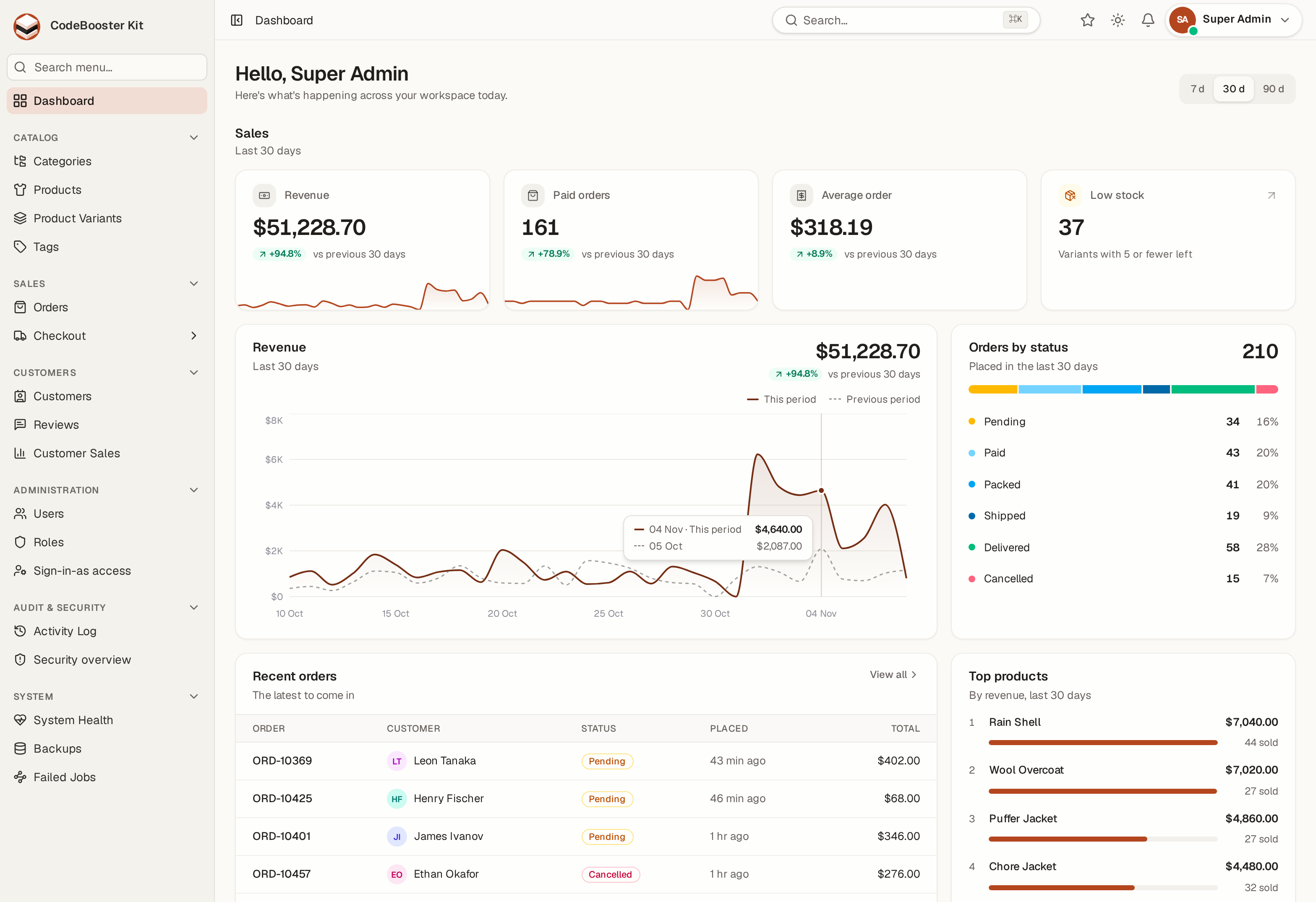
Dashboard
KPI tiles, a daily sign-up chart over 7/30/90 days, per-role distribution and the example shop's orders by status, with the revenue taken.
User Management
Server-side search & pagination, bulk actions, account suspension, invitations by signed link, CSV export — and import from a spreadsheet: name, email, roles and an optional password per row, checked row by row on a dry run before anything is written. A duplicate email skips its row and says so; super-admin and roles above your own are refused per row rather than failing the file.
Roles & Permissions
Grouped permission matrix, coverage meters, role assignment — built on spatie/laravel-permission.
Security Board
What the audit trail cannot answer on its own: is somebody attacking this installation right now? Failed sign-ins and lockouts aggregated over 24 hours, 7 or 30 days — the addresses doing it, the accounts they aim at, detections graded by severity — and a posture panel where every finding names the .env key or the screen that fixes it.
Activity Log
Every create/update/delete is recorded with the actor, event and a field-level diff.
Application Settings
Dynamic app name, mail/SMTP config (encrypted), and database backups — all from the UI.
Single Sign-On
Sign in with Google or GitHub, or link either to an existing account from Security settings. A provider appears only once its credentials are configured, so a fresh install shows no buttons and has nothing to switch off. An account is claimed automatically only when both sides proved the address — the provider says it verified it, and the local account verified it too. No provider tokens are stored.
Presentation Mode
One button in the top bar takes the browser full screen and drops the app’s own chrome — sidebar and top bar — so a screen fills the projector. Available on every page; leave with Escape or the floating button.
Security Policy
What the installation requires of everyone, set once by super-admin: which roles must have a second factor (each role shows how many holders would be asked to enrol before you tick it), what a password must look like and how old it may get, and how long an idle session lives. Someone who falls short is held at their Security screen — not signed out — with a banner that says why, until they comply. Nothing is required by default.
Notifications & API Tokens
An in-app notification bell, plus a Settings screen to issue scoped, expiring API tokens.
Account Security
Two-factor authentication with an authenticator app and recovery codes, passkeys (fingerprint, face or a security key — no password typed), and browser sessions: see what is signed in and sign the others out. Changing a password ends every other session on its next request.
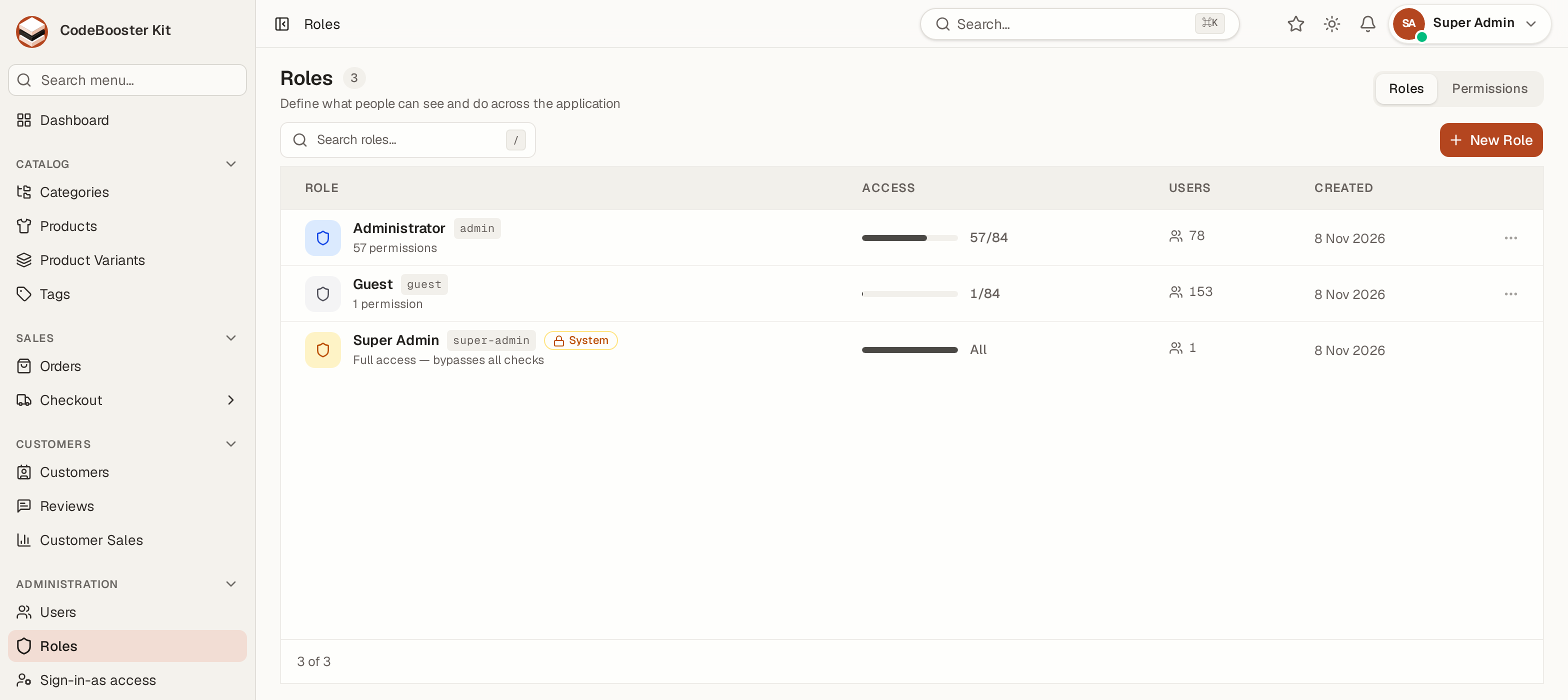
Role-based access control (RBAC)
Access is enforced on every action of every controller via can: middleware, and the sidebar hides menus a user can't reach. A super-admin role bypasses all checks. Each module has its own permission group (view, create, edit, delete, and more). Chapter 5
5 Anatomy of a Module
A small clothing shop ships with the kit as its example: ten modules, every one of them written by make:crud from its migration. They are not scaffolding to delete — they are the pattern every table of yours should follow, and they are complete.
5.1 The example shop
| Module | Shape it demonstrates |
|---|---|
| Catalog | |
| Categories | A tree: each category may sit under a parent, shown as an indented tree view; its level (department or category) is filled by the model, not the form. Public read-only API by slug. |
| Products | The wide one: searchable SKU fixed after creation, status tabs, a price that needs its own permission to change, a cost kept out of the public API, a photo gallery in WebP sizes, a video preview, a size-chart file, rich text, a form in sections, a slug that follows the name, a category picked by its path in the tree, who put it on sale and when, tags through a pivot, CSV import and a public API. |
| Product Variants | A child edited in place on its parent's page and in the table: a SKU held to a pattern, one variant per size and colour, a size enum with labels, a colour swatch, a price override, stock, and measurements in a control of the shop's own (widget:). |
| Tags | A many-to-many list edited from the other side — a product picks tags, and a name that does not exist yet is created inline. |
| Sales | |
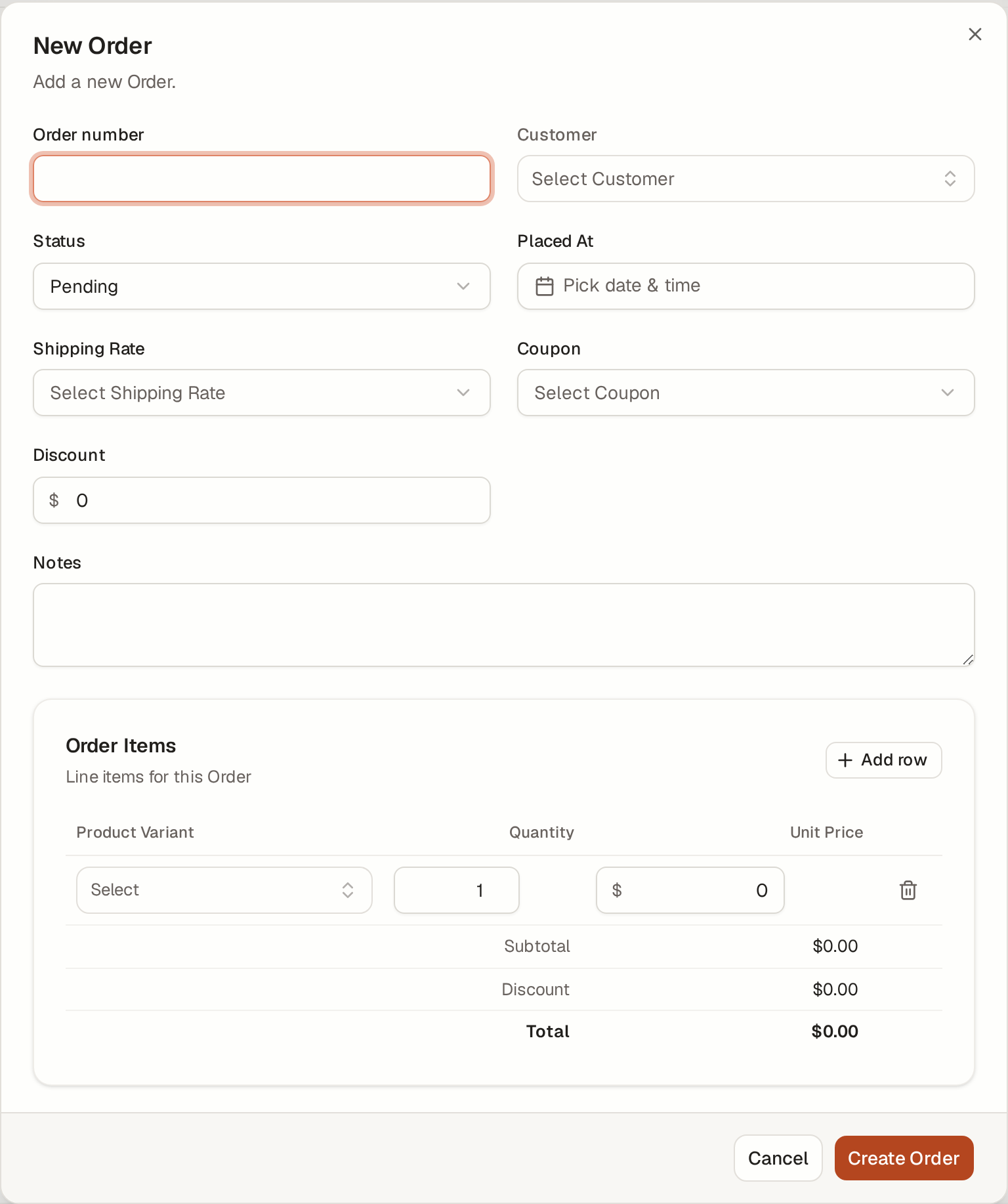
| Orders | Master–detail: order lines with quantity, unit price and line totals the form adds up. A workflow (pending → paid → packed → shipped → delivered, or cancelled) that locks finished orders and stamps who shipped them and when, a board by status, a calendar by date, a customer picker that searches as you type, coupons listed under their kind, and a list that opens on the newest. |
| Coupons | Fields that follow a choice: a percentage or a fixed amount, shown by the kind picked, a validity date range, and a coupon for one product or one category (a polymorphic key). Listed with Shipping Rates under one Checkout group of the menu. |
| Shipping Rates | The plainest module: a name, money, a number, a switch, and one rate that is the default. |
| Customers | |
| Customers | A map view from latitude and longitude, a tier the application sets (VIP is earned), an encrypted tax number and a date of birth kept to the record, import, and their orders and reviews on the record's page. |
| Reviews | A star rating and an approval step: a review waits for an approver before it is published, only a product on sale can be reviewed, and the shop's reply is written once the review is in. |
| Customer Sales | A report read from a database view: each customer's paid orders and revenue, read-only, every row linked to its customer. |
Between them they exercise every part of the machinery. Whatever your table looks like, one of the ten is close enough to copy — and make:crud builds yours the same way from your migration. Deleting a category or a customer that orders or products still point at is refused with a readable message rather than cascading.
5.2 What each module is made of
| File | What's inside |
|---|---|
| Model | $fillable, casts(), relationships, search scope, typed properties |
| Form Requests | A base class holding the rules once; Store and Update differ only in how they phrase uniqueness |
| Query class | Search (ilike), filters, and a whitelisted sort — injection-safe |
| Controllers | The resource controller (index, show, the form's create/update/delete) and one controller per further thing a screen does — …FormController, …ExportController, …ExcelExportController, …ImportController, …BulkController, …RestoreController, …TrashController, …FileController and the rest. Every controller answers with Laravel's resource actions only (index, show, create, store, update, destroy), so the project passes Pest's laravel architecture preset. Each action is authorized with #[Authorize] through the policy and hands its write to an action |
| Actions | Store…, Update…, Delete…, Restore…, ForceDelete… for one record, and a Bulk… action per selection write — each with its audit entry, so the controller stays HTTP |
| Policy | Every decision about the module, in one place: each ability is the module's permission, and a change to one record is also bound by the model's scopeWritable(). The controllers, the API and the pages (an abilities prop) all ask it; none of them names a permission |
| OpenAPI spec | With --api: how the module's endpoints describe themselves in the OpenAPI documents, beside the API controller |
| Enum classes | Native backed enums, with a matching database CHECK constraint |
| Columns class | The column list, declared once and read by the index, CSV and Excel |
| Observer + Stats | Cached per-status counts, invalidated on every write |
| Factory | Realistic, type-aware fake data for tests and demo rows |
index.tsx |
Data table: search, filters, sort, bulk, column toggle, pagination |
form-modal.tsx |
The right input for every field type, with client + server validation |
show.tsx |
Detail page with relation panels and an audit timeline |
| Feature test | RBAC, CRUD, filters, bulk, and security cases (A03 injection, A04 mass-assignment) |
5.3 What is shared rather than repeated
A module is thin because the work lives underneath it. These are yours to use from any table you add, and none of them know anything about the examples:
| Concern | Where |
|---|---|
| Column definitions, CSV and Excel export | app/Support/Table/ |
| Filter declarations — read, applied and counted from one line | app/Support/Table/FilterSet.php |
| Dropdown options, capped and cached | app/Support/Lookup/Options.php |
| Audit diff and per-record timeline | app/Support/Audit/ |
| Refusing a delete that other rows depend on | app/Support/Db/DeleteRefusal.php |
| Table, toolbar, filters, dialogs, form fields | resources/js/components/ |
| Interface strings — Indonesian and English | resources/js/lib/ui-text.ts, lang/ |
5.4 Two rules worth knowing early
A column is declared twice, and only twice. Once in app/Columns/<Model>Columns.php, which the index payload, the CSV and the Excel export all read; once in resources/js/pages/<module>/columns.tsx, which the table header, the body and the loading skeleton all read. Adding a column is those two lines.
A filter is declared once. One line in app/Queries/Filtered<Models>.php teaches three separate things at once: how to read the value off the request, how to apply it to the query, and whether it actually narrows the result — which is what decides if the page may use its cached row count instead of counting the table again.
5.5 Taking the examples out, once you no longer need them
They earn their place while the shape is still unfamiliar. Once your own modules exist and the shop is only noise, one command removes it for good:
php artisan kit:remove-examples --dry-run   # see everything that would go
php artisan kit:remove-examples
It is about 480 files, and that is the easy half. The hard half is the nine places a module registers itself: its route file and the require line that loads it, the API routes, the sidebar entry and its icon import, the global search registration, the role seeder, the Pest group, and the dictionary keys in resources/js/lib/ui-text.ts. Delete the folders by hand and every one of those survives, pointing at classes that are gone — an unused import alone is a build error in this project, and the next php artisan call fails outright.
It also takes the shop's five dashboard panels (app/Dashboard/Examples, resources/js/dashboard/examples) with their lines in config/dashboard.php and widgets.tsx, the note above each example page that shows the make:crud command it came from (config/examples.php), the migrations that create those tables and hold their enum columns to their values, and ExampleDataSeeder along with its entry in DatabaseSeeder. That seeder is the one most people miss: it imports the shop's models, so a project that removed the modules without it dies on the next db:seed — in a file nobody thought to open. It removes code, not tables, unless you ask. The eleven shop tables (products, orders, customers and the rest) and every row in them are left exactly where they are — dropping data is your decision, not a side effect of tidying up. Because the migrations are gone, a fresh database will simply never create them again; --drop-tables drops them now, and nothing else. Upgrades keep them out. A later release may change the example shop. make upgrade sees that this project removed it and leaves the shop's new files out, and says how many it left out. The test suite stays green. The kit's tests of its shared helpers — trash and restore, delete refusal, lookup options, filter sets, route authorisation — run on a fixture of their own (tests/Fixtures, three tables that exist only in the test database), not on the examples. The tests that exist purely to exercise the example modules live in tests/Feature/Examples, and the command deletes that folder with the modules. Measured on a clean 1.15.0 install: 703 passing before, 484 after, zero failing. If you have written tests of your own against Product or Order, the command names them so nothing is discovered later.
Run npm run build afterwards, which the command reminds you to do.
6 Designing Your Table
The schema decides most of what a module can do. A few conventions are worth following before you write any PHP, because changing them later means changing code. Name a relation column after the relation, not the foreign key. In app/Columns/…Columns.php, a column that displays a related record is declared ->add('category', 'Category', fn ($row) => $row->category?->name) — not 'category_id'. That key is what the React table reads back as item.category. Get it wrong and every row in that column renders an em dash: no error, no warning, no failing test. Use ->importTo('category_id', …) to tell the CSV importer which key to write. Every hint, and which one a field needs docs/hints.md describes all of the hints the generator reads, each with an example line, and the README carries the same table. docs/schema-recipes.md goes the other way: from a field as people describe it — a price, a phone number, a status, a category — to the column and hints it needs. Both are what an AI agent reads too (chapter 15).
6.1 A table the kit is comfortable with
Schema::create('products', function (Blueprint $table) {
    $table->id();
    $table->string('name');
    $table->string('sku')->unique();
    $table->foreignId('category_id')->constrained()->restrictOnDelete();
    $table->decimal('price', 12, 2);
    $table->string('status')->default('draft');
    $table->boolean('is_active')->default(true);
    $table->timestamps();
    $table->softDeletes();

    $table->index('status');
    $table->index('price');
});
6.2 The conventions, and why each one earns its place
| Convention | What depends on it |
|---|---|
id() — a bigint primary key |
Route model binding is constrained to digits, so a mistyped URL is a clean 404 instead of a database error surfacing as a 500. |
softDeletes() |
Deleting becomes reversible, and the module gets a trash view. Without it, delete is permanent and the restore paths are simply absent. |
timestamps() |
The default ordering, the "Created" column and the record-info panel all read them. |
restrictOnDelete() on a lookup FK |
The refusal reaches the user as a sentence naming how many rows depend on the one they tried to delete. A cascade would remove them at the database level — soft deletes do not apply there, and the audit log records nothing. |
A unique() business identifier |
Becomes the second line under the record's name on the index and detail pages, so a row is identifiable when two people share a name. |
| Indexes on what you filter and sort by | Invisible on demo rows, decisive on real ones. Every filtered list without one is a sequential scan. |
6.3 Column comments carry intent
The example migrations put a short comment on some columns:
$table->string('name')->comment('searchable;display');
$table->string('status')->comment('filter;tabs;enum:draft,active,archived');
$table->jsonb('photos')->nullable()->comment('image;multiple;variants');
These record why a column is shaped the way it is — which one is the record's human label, which ones the search box covers, which one drives the status tabs. They are documentation that lives in the database rather than in a file beside it, so they survive a schema dump and are visible to anyone reading the table directly.
Follow the same habit in your own migrations. Six months later the comment is the fastest answer to "why is this column in the search but that one is not".
6.4 What the generator reads from a table — and what it leaves to you
When you build a module with make:crud, the module's shape comes from the table itself, not from flags. The complete list of what is read (types, nullability, unique indexes including partial ones, every foreign key, CHECK value lists and numeric ranges) and the full hint vocabulary are in README.md under Build a module from your own table. What matters here is the other half: the rules a database can hold that no generator can turn into a form field.
| In the database | What the module does | What you write |
|---|---|---|
A CHECK across columns — (status <> 'rejected') OR (reason IS NOT NULL) |
Not read. The form accepts the row, the database refuses it, and the person sees a toast naming the constraint — never a server error. | required_if / prohibited_unless in customRules() of app/Http/Requests/<Model>/<Model>Request.php, and a factory state() that respects it. |
| A trigger | Not read; its refusal reaches the person the same way. | Enforce it in the Action, or say it in the field's help text. |
A unique index over an expression — lower(email), COALESCE(unit_id, 0) |
Not treated as unique; the database still enforces it. | A Rule::unique or closure rule by hand. |
CHECK (level IN (1, 2)) on an integer column |
Read as a number, not a list. | validate:in:1,2 in the column comment. |
"Who and when" pairs — closed_at, closed_by |
Paired by name: the _by column is shown with its _at. |
stamp: (or stamp-once:) on the _at column names the status that fills both — no Action code. |
7 Field Types — The Full Matrix
Every common column type is understood and given the correct input, display, validation, cast and fake-data strategy — automatically.
| Column | Form control | Notes |
|---|---|---|
| string / text | Input / textarea | Length & required derived from the schema |
| integer / decimal | Number input | Money columns get the APP_CURRENCY symbol, grouping and decimal mark |
| boolean | Switch | Yes/No badge in the table |
| date / datetime / time / year | Date / date-time / time / year pickers | Purpose-built pickers, correct casts |
| enum | Select | Native backed enum + colour-coded status badge |
| enum (multiple) | Checkbox group | Stored as a JSON array of values |
| foreign key | Select / async combobox / cascade | Large tables get a searchable combobox automatically |
| json / jsonb | Monospace textarea | Validated as JSON |
| image / file | Upload with preview | Single or multi-file gallery |
| password | Masked input | Hashed, hidden, never leaves the server |
| color / rating / slug | Colour picker / stars / auto-slug | Slug auto-fills from the title until edited |
| rich text / embed | HTML editor / embed preview | HTML cleaned to an allow-list when saved and when read; allow-list rendering |
| computed (generated) | Read-only | Database-computed columns shown but never written |
array (text[], int[]) |
Chip list | Type, press Enter, click × to remove. Duplicates refused |
| sensitive | Input, masked on the detail page | Shown as ••••0002 with a reveal button |
masked (mask:) |
Formatted input | Six formats; one comment sets the mask, the server rule and the seeded value at once |
Masked columns — one comment, three behaviours
A mask: hint on a column comment does three things at once, and the point is that they cannot drift apart: the browser formats what is typed, the server validates the same shape, and the factory seeds values that satisfy it. Add the hint and the whole column follows.
| Hint | Goes on | Reads as | Server rule | Seeded as |
|---|---|---|---|---|
mask:nik |
string | 1234 5678 9012 3456 | digits:16 |
16 random digits |
mask:npwp |
string | 12.345.678.9-012.345 | digits:15 |
15 random digits |
mask:kk |
string | 1234 5678 9012 3456 | digits:16 |
16 random digits |
mask:phone |
string | 0812 3456 7890 | 9–15 digits | a mobile number |
mask:currency |
integer, decimal | the APP_CURRENCY symbol, grouping and decimal mark |
the column's own numeric rule | a plausible amount |
mask:percent |
integer, decimal | trailing %, same separators as money |
the column's own numeric rule | 0–100 |
$table->string('nik', 16)->comment('mask:nik');
$table->string('telepon', 20)->comment('mask:phone');
$table->decimal('harga', 12, 2)->comment('filter;mask:currency');
$table->integer('diskon')->comment('mask:percent');
Why the mask carries a server rule as well A mask that lived only in the browser would be checked in exactly one of the three ways a value can arrive. The REST API and the CSV importer do not run your form, so a national id column would take letters from either of them while looking strictly validated on screen. The rule mirrors the mask rather than inventing a second opinion about the same column.
A mask outranks the column name. Factories normally guess from the name, and the two would otherwise disagree: fake()->phoneNumber() returns (+62) 923 0073 5568, which the digits-only rule that mask:phone just added would reject — every seeded row failing the hint that seeded it. The same applies to numbers: diskon matches the money keywords, so without this a percentage column would be seeded with prices.
What a mask does not do is invent a range. mask:percent adds no between:0,100, because a growth figure of 140% and a temperature change of −3% are both percentages. Declare a range where ranges belong: validate:between:0,100. Array columns A Postgres text[] or int[] column — tags, emails, allowed_roles — is edited as a list of removable chips rather than one text box. Two pieces do the work, and both are yours to reuse on any module you build: cast the attribute to App\Casts\PostgresArray::class, render <ListInput> in the form, and validate with ['array'] plus a rule on field.*.
The cast is not optional and Laravel does not ship one. A Postgres array reaches PHP as the literal {a,b} — a string — and the built-in array cast is JSON, which is a different format. Splitting that literal on commas looks right until an element contains one: {"Jakarta, ID","Bandung"} is two values, and a naive split makes four with stray quote marks. Masking a sensitive column — and what it is not Mark a column sensitive and its value stays out of the table, the row payload, exports, search and inline editing, and is redacted in the audit diff. On the detail page it is masked, with a button to reveal it — so a national id is not sitting in the open on a screen someone walks past, in a screen recording, or in a screenshot pasted into a ticket.
This is not access control. The value is still sent to the page, so anyone allowed to open the record can read it whether or not they click. Real access control means not sending the value until it is asked for, over an endpoint that authorises and logs the request. That is a different feature, and this one should not be relied on as though it were that one.
Smart fake data Factories pick values from the column name, not just its type: email→ a real email, harga→ a sensible price, alamat→ an address. A mask: hint outranks the name, as above. Set APP_FAKER_LOCALE=id_ID for Indonesian names, phones and addresses. Chapter 8
8 Eloquent Relationships Explained
Relationships are how tables connect. Laravel's ORM, Eloquent, models them as methods on your model. The example modules show both sides of each kind, written out.
If you're new to Eloquent: a relationship is a way to say "this record belongs to / has many of / is linked to" records in another table. Instead of writing SQL joins, you write $order->customer or $category->products and Eloquent fetches them. Here is each kind, and what the kit does with it.
belongsTo — "each X has one owner"
A foreign key like products.category_id means every product belongs to one category. The module has a category() method, a searchable select in the form, a filter on the index, and shows the category's label wherever the product appears.
$table->foreignId('category_id')->constrained();

// generated on the Product model:
public function category(): BelongsTo
{
    return $this->belongsTo(Category::class);
}
hasMany — "one X, many children"
The reverse of belongsTo. Because products point at a category, a category has many products. The parent gets a products() method and a panel on the category's detail page listing them — with an inline "+ Add" editor when the children are simple.
// generated on the Category model (reverse of the FK above):
public function products(): HasMany
{
    return $this->hasMany(Product::class, 'category_id');
}
Cross-module links If both the parent and the child are modules, the child rows on the detail page become clickable, with "View all" (filtered) and "+ New" (with the parent pre-selected) shortcuts.
hasOne — "one X, one child"
Same as hasMany, but when the child's foreign key is unique (e.g. one contract per project), use hasOne and show a single card instead of a list.
belongsToMany — "many-to-many"
When two tables link through a pivot table (e.g. products ↔ tags via product_tag), each side belongs to many of the other. The form gets a multi-select in the form (or a "tags" input that can create new options on the fly), syncs the pivot on save, adds a filter, and shows badges on the detail page.
public function tags(): BelongsToMany
{
    return $this->belongsToMany(Tag::class, 'product_tag')->withTimestamps();
}
Polymorphic — "one relation, many targets"
Sometimes a record can attach to several different kinds of parent — a document that belongs to an asset or a purchase. That's a polymorphic relationship (morphTo / morphMany). The form uses a two-step picker (choose the type, then the record) and a read-only panel on each target.
Self-referencing — "a tree"
When a table's foreign key points at itself (categories.parent_id → categories), you have a hierarchy. Wire parent() and children(), prevent a row being its own parent, and enables the Tree view (Chapter 9).
| You add… | What the module then needs… |
|---|---|
| A foreign key | belongsTo on this model + hasMany/hasOne on the target |
| A pivot table (2 FKs) | belongsToMany on both models + sync on save |
type + id columns w/ morph: |
morphTo here + morphMany on each target |
| A self-referencing FK | parent() + children() + the Tree view |
9 Index Views
Every module opens as a fast, server-driven data Table. A second view ships for hierarchies, as a component you can add to a module's index page.
| View | Component | Best for |
|---|---|---|
| Table | built into every index page | The workhorse — search, filter, sort, bulk, paginate at any scale |
| Tree | components/tree-view.tsx |
Hierarchies — categories, org charts, regions |
It takes the same rows the table already receives, so adding it is a view switcher and a branch in the module's index.tsx — no second endpoint and no second query.
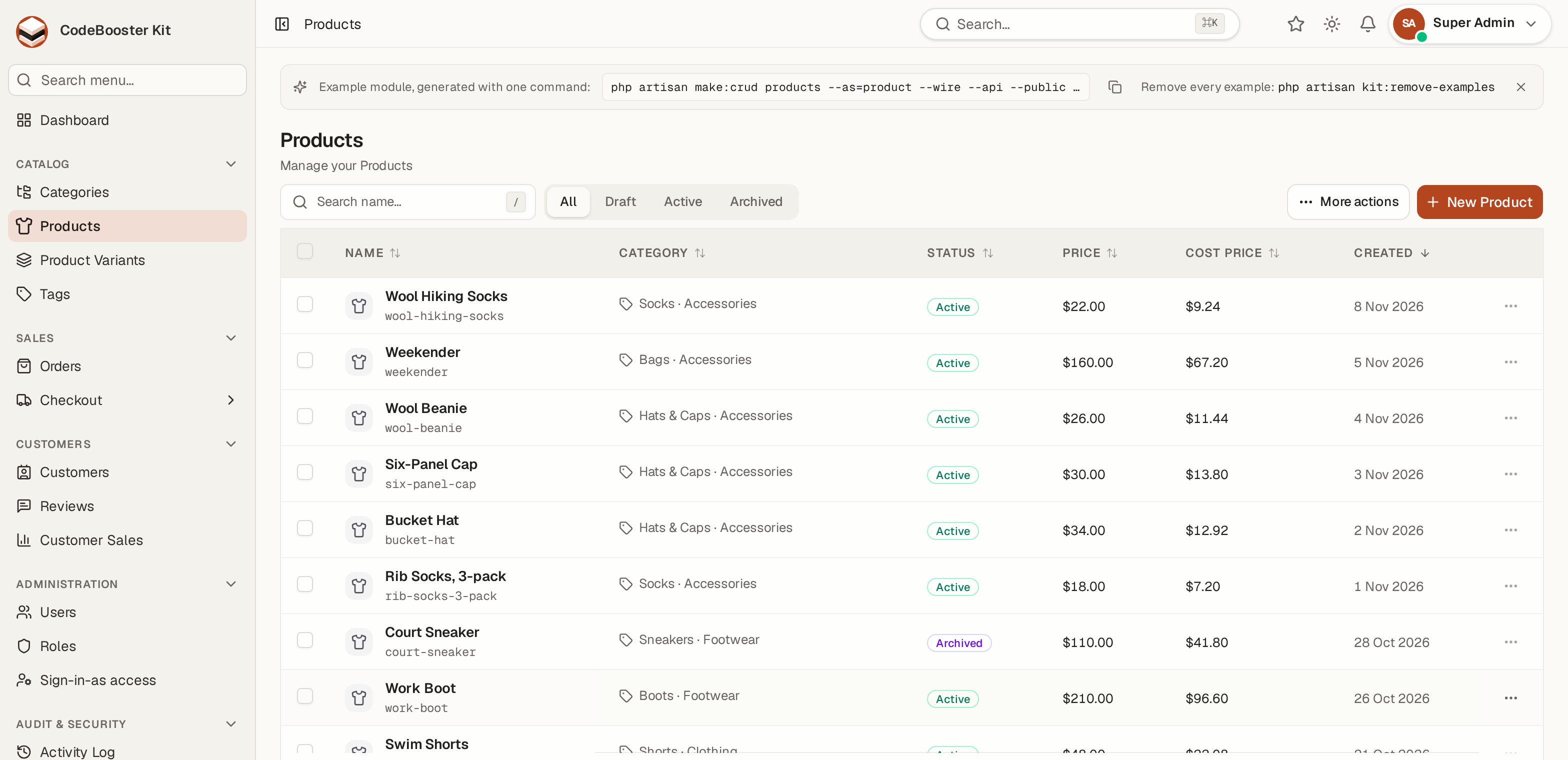
Opt-in by design A module has the Table only until it asks for more. A view that costs a reader a switcher they never use is not a free feature. In the example shop, Orders asks for a Board and a Calendar, Customers for a Map and Categories for a Tree; the rest keep the Table alone. Chapter 10
10 Actions, Export & Import
Every module comes with the back-office actions your users expect — all permission-gated and filter-aware.
CSV Export
Stream the current filtered selection to CSV. FK columns export their label, enums their value. Protected against spreadsheet formula injection.
Excel Export
The same filtered selection as an .xlsx workbook. Streamed in chunks, so a large export stays within memory, and refused rather than silently truncated when it would not finish.
CSV Import
Opt-in with --import. Download a template, upload rows; each is validated like a single create, invalid rows are skipped & counted.
Bulk Actions
Select rows (or "all matching") to delete, set status, or reassign a foreign key in one request. The bar changes with the view: inside the Trash it offers Restore and Delete permanently instead, so an action can never be aimed at rows the screen is not showing.
Trash & Restore
Deleting is a soft delete on every module, so nothing is lost by a misclick. Undoing one takes a permission of its own — <module>.restore and <module>.force-delete: a restore puts back a record somebody decided should go, and a permanent delete is the one action that destroys data outright. Out of the box only super-admin holds them; grant them to another role in the role matrix when it should undo deletes. The Trash toggle in the toolbar appears to holders alone, and both actions work on a whole selection as well as on one row.
Duplicate & Saved Views
Clone a record into a pre-filled create form; save filter presets per user, per module. Chapter 11
11 REST API
Any module can expose a full, secured REST API — opt-in, with zero third-party packages beyond Laravel Sanctum. 1 Expose it — a module gets an API when it has an API controller, a resource and a line in routes/api.php; its entry in the OpenAPI documents is a class of its own beside them. Every module of the example shop ships with theirs; copy them from Product for a table of your own:
app/Http/Controllers/Api/ProductApiController.php
app/Http/Resources/ProductResource.php
app/OpenApi/ProductApiSpec.php
2 Issue a token — go to Settings → API Tokens, choose a scope (read or read+write) and how long it lives — 30, 90 or 365 days. The token is shown once, and stops working on its expiry date; a token that never expires is offered only when API_TOKENS_NON_EXPIRING=true. 3 Explore it — visit /api/docs (open to accounts with the settings.api permission, the one that issues tokens): Swagger UI over the OpenAPI 3 document. Click Authorize, paste your token, and "Try it out" live; Download OpenAPI (JSON) imports into Postman, Insomnia or a client generator.
# List, filtered, with a related record embedded:
curl -H "Authorization: Bearer <token>" \
     "http://localhost:8002/api/v1/products?search=lamp&include=category"
| Capability | Detail |
|---|---|
| Auth | Sanctum personal access tokens, per-token expiry |
| Scopes | A read-only token is rejected on any write (403) |
| Reuse | Same validation, filtering & RBAC as the web module |
| Docs | OpenAPI 3.1 document (checked against the OpenAPI Initiative's own schema, and with Redocly): each generated module describes its own fields, rules, filters and relations; only the verbs whose routes exist are listed |
| Rate limit | 60 requests/minute per user out of the box |
12 Advanced Features
Audit timeline & diff
Each detail page shows the record's history — who changed what, with a per-field old → new diff, foreign keys resolved to labels.
Inline hasMany editor
Add or delete simple child rows directly from the parent's detail page, without navigating away.
Impersonation
Sign in as another user to reproduce what they are seeing, with a marker in the top bar of every page and every action attributed to you in the audit log.
Personal-data export & erasure
A user can download everything held about them as JSON, or request erasure — the account is anonymised rather than deleted, so referenced rows stay intact.
Field-level permissions
Mark a column restricted so only privileged users can change it (e.g. only head-admin edits "status").
Duplicate / clone & templates
Clone a record, download an import template, or scaffold an entire new project from the current one.
Indonesian, complete
The Indonesian dictionary ships finished beside the English one, and NIK, NPWP and KK are field types with their own mask, validation and fake data.
Live updates
When somebody else saves, every open list picks the change up by itself and the affected row lights up briefly — no refresh, no polling. It waits instead of refreshing while you have rows selected or a dialog open, so a bulk selection is never pulled out from under you. How live updates work, and why it is safe. A change broadcasts a signal that carries no data at all — just the module's name. The browser then re-asks the ordinary controller for the list, so your permissions, filters, page and totals are applied by the same code that drew the page in the first place. Nothing about a record travels over the websocket, which is why the channel needs no per-field authorisation.
Powered by Laravel Reverb, running as its own container. Remove that container and the feature turns itself off: the server stops handing out a channel and the pages render exactly as they did before. Readers can also switch it off per browser in Settings → Appearance, where the connection status is shown. Running the kit in Indonesian. Nothing has to be installed or translated. Set five keys in .env — APP_LOCALE=id, APP_FALLBACK_LOCALE=id, APP_FAKER_LOCALE=id_ID, APP_TIMEZONE=Asia/Jakarta, APP_CURRENCY=IDR — and every screen follows. The block is already in .env.example, commented out.
The language is per reader; the currency and the timezone are per installation. APP_LOCALE is only the default: the picker in the user menu overrides it for whoever is looking, so a local team and an overseas colleague read the same screen in different languages. The other two are deliberately not like that — a decimal(n, 2) column holds one amount and a timestamp one instant, so re-labelling either per reader would change what the number means.
Three Indonesian document formats are first-class column types, and one comment gives you the input mask, the server-side rule and realistic seeded values at once: mask:nik (16 digits, grouped in fours), mask:npwp (15 digits) and mask:kk. mask:phone, mask:currency and mask:percent work the same way.
Names from your schema are never translated — column names, field labels, enum values, relation names. A dictionary that reached those would be translating your database, and the two would drift apart the first time either changed. Everything is tested Every module ships with its own Pest feature tests — authorization, CRUD, filters, bulk actions, and explicit security cases (rejecting SQL-injection sort columns, dropping mass-assigned ids). Each route and the permission it answers to is one row of a dataset, and so is each of the form's rules; the toasts and redirects a write ends in are checked, not just its status code. A module's tests run alone with ./scripts/test.sh --group=product, and pest --mutate mutates the module's own controllers, actions, requests and policy against them. Each module also checks its own architecture with arch(), and the project passes Pest's php, security and laravel presets. The whole project stays green at PHPStan level 8. Chapter 13
13 End-to-End Walkthrough
Let's add a real Suppliers module — foreign key, money, enum and search — from an empty table to a live, tested screen, by copying a module that already ships. make:crud suppliers does all of this in one command (README, Build a module from your own table); the walkthrough is the same result built by hand, so you know what every file is for. Which module to copy — decide this first. Every module carries the same table, filter and toolbar machinery, so the copy is never tiny. What differs is how many fields you then have to remove.
| Copy… | Size | When |
|---|---|---|
shipping-rate |
4 columns · 34 files · ~3,500 lines | Default choice. Plain fields, money and a switch, no enum, no relations |
product-variant |
7 columns · 39 files · ~4,300 lines | A foreign key, money and an enum |
coupon |
9 columns · 46 files · ~4,800 lines | An enum whose fields follow it (show-if), a date range and a trash |
product |
10 columns · 62 files · ~7,600 lines | Only when you need images, rich text, a pivot, an import and status tabs at once |
Schema::create('suppliers', function (Blueprint $t) {
    $t->id();
    $t->foreignId('category_id')->comment('filter')->constrained()->restrictOnDelete();
    $t->string('name', 100)->comment('searchable;display');
    $t->string('code', 20)->unique()->comment('searchable;immutable');
    $t->string('terms', 10)->default('net30')->comment('filter;enum:prepaid,net30,net60');
    $t->decimal('minimum_order', 10, 2)->default(0);
    $t->timestamps();
    $t->index('category_id');
});
The foreign key points at a table that already exists. constrained() fails at migrate time if the referenced table has not been created — so point it at categories, which the example shop ships, rather than inventing a table you would have to migrate first. Pointing at your own new table is fine; just create that table in an earlier migration. 2 Migrate.
docker compose exec app php artisan migrate
3 Copy the module and rename. Copy these files, and the folders whole, replacing every spelling of the module's name (ProductVariant, productVariant, product-variant, product_variant, Product Variant) with Supplier, supplier and Supplier throughout:
app/Models/ProductVariant.php                app/Enums/ProductVariantSize.php
app/Columns/ProductVariantColumns.php        app/Observers/ProductVariantObserver.php
app/Queries/ProductVariantStats.php          app/Queries/FilteredProductVariants.php
    (ProductVariantStats also carries the live-update signal — see chapter 6)
app/Queries/ProductVariantFormOptions.php    app/Policies/ProductVariantPolicy.php
app/Actions/ProductVariant/                  app/Http/Requests/ProductVariant/
app/Http/Controllers/ProductVariant/         app/Http/Controllers/Api/ProductVariantApiController.php
app/Http/Resources/ProductVariantResource.php app/OpenApi/ProductVariantApiSpec.php
database/factories/ProductVariantFactory.php routes/modules/product-variant.php
resources/js/pages/product-variant/          lang/{en,id}/attributes/product-variant.php
tests/Feature/ProductVariantModuleTest.php
Three things a find-and-replace gets wrong, and all of them still compile.
- A two-word name has five spellings. Replace the joined forms first (
ProductVariant,productVariant) and then the separated ones; a missedproduct-variantleaves a route name or a permission pointing at the old module. - UPPERCASE identifiers are not matched.
PRODUCT_VARIANT_COLUMNSincolumns.tsxsurvives and is imported elsewhere. Rename it too. - The foreign key is not the module's name.
product_id, theproduct()relation and theProductimport are untouched by the replace — Suppliers belong to acategory, so change them by hand. Check every remaining identifier against your migration. 4 Replace the fields. This is the real work: ProductVariant has 7 columns and Suppliers has 5, so roughly 650 references across 39 files have to change. Work through them in this order — each one tells the next what to expect.
| File | What to change |
|---|---|
app/Models/Supplier.php |
$fillable, casts(), the @property docblock, the belongsTo relation, and the columns inside scopeSearch() |
app/Enums/SupplierTerms.php |
Renamed from SupplierSize; the cases — prepaid, net30, net60 |
app/Columns/SupplierColumns.php |
One ->add() per column. Name a relation column after the relation, not the foreign key — see section 6 |
app/Queries/FilteredSuppliers.php |
The filters, the ->with() eager load, and the sortableBy() list |
app/Queries/SupplierStats.php |
The cache key, and the module name inside ModuleSignal::changed() — miss that one and your Suppliers table refreshes when variants change and never when suppliers do. It is silent: nothing errors, the wrong list simply updates |
app/Http/Requests/Supplier/SupplierRequest.php |
All validation rules. Every request for a module lives in that one folder — the abstract base here, plus Store/Update and the bulk classes beside it |
app/Http/Controllers/Supplier/ |
The load() and the show payload in SupplierController, and the record the form opens with in SupplierFormController |
app/Queries/SupplierFormOptions.php |
The lookup lists the form offers — the categories instead of the products |
app/Actions/Supplier/ |
The audit sentences, and in BulkAssignSuppliers the foreign key it reassigns |
SupplierResource.php · SupplierFactory.php · SupplierApiSpec.php |
The field lists |
pages/supplier/types.ts |
SupplierRow, SupplierDetail, ColumnKey, Filters, ENUM_LABELS and the option types |
pages/supplier/columns.tsx |
The column array, SECONDARY_COLUMNS, and STATUS_PALETTE — its keys must match your enum values or the badges lose their colour |
pages/supplier/index.tsx |
The page: the filter list the selection is keyed to (signature), activeFilterParams, and the options passed to the filters and the form. The table itself is the shared DataTable |
pages/supplier/filters.tsx |
One filter control and one chip per filterable column, and the option lists they take |
pages/supplier/form-modal.tsx |
SupplierFormItem, the useForm state, Options, and one <FormField> per field. The dialog around them is the shared CrudFormDialog |
pages/supplier/show.tsx |
The <DetailRow> list, inside the shared RecordPage and RecordHeader |
lang/{en,id}/attributes/supplier.php |
The field labels validation messages use |
tests/Feature/SupplierModuleTest.php |
Do not skip this one. It posts the old field names and asserts on a relation your module does not have, so it fails until its payloads and assertions match your schema |
| File | What to add |
|---|---|
routes/web.php |
require __DIR__.'/modules/supplier.php'; |
routes/api.php |
The apiResource line, if you want the REST API |
resources/js/components/app-sidebar.tsx |
A nav item in moduleNavItems(), plus its icon import, and its route base in a MODULE_SECTIONS heading (Catalog, or one of your own) |
app/Support/Search/GlobalSearch.php |
A registry entry, so ⌘K finds suppliers |
docker compose exec app php artisan db:seed --class=RoleSeeder
The admin role is an allow-list, not "everything minus a few". A module you forget here is invisible to admin: no menu item, no ⌘K result, 403 on the URL. That is the intended default — new capabilities are granted deliberately, not inherited. 7 Regenerate the typed routes and build.
docker compose exec app php artisan wayfinder:generate --with-form
docker compose exec app npm run build
8 Done. Visit /supplier. You have a searchable, filterable, sortable table, bulk actions, CSV and Excel export, an audit timeline, a REST API at /api/v1/suppliers, and a test suite. Run it:
./scripts/test.sh --filter=SupplierModuleTest
Red the first time is expected unless you updated the test file in step 4 — it was copied with the old field names and posts them to your new endpoints. Treat the failures as the last item on the checklist: each one names a field your schema no longer has. How long this takes. Steps 1–3 and 5–8 are minutes. Step 4 is the module: budget half a day for your first one, much less afterwards — or one command, make:crud suppliers --wire, which writes all of it from the migration. Adding a column later. Two lines: one in app/Columns/SupplierColumns.php, one in resources/js/pages/supplier/columns.tsx. Then the validation rule in customRules() of SupplierRequest.php and the input in form-modal.tsx if it should be editable. Nothing else has to know.
14 Setting up Single Sign-On & passkeys
Google and GitHub sign-in are optional and off until you supply credentials. A provider's button appears on the login page the moment its client id and secret are both set — no code, no rebuild in development. Leaving the whole block empty is a working configuration, not a broken one.
- At
console.cloud.google.com, open APIs & Services → OAuth consent screen and complete it once for the project. - APIs & Services → Credentials → Create credentials → OAuth client ID.
- Application type: Web application.
- Under Authorised redirect URIs, add your app's URL followed by
/auth/google/callback— for examplehttps://app.example.com/auth/google/callback. - Copy the client ID and secret into
GOOGLE_CLIENT_IDandGOOGLE_CLIENT_SECRET.
GitHub
- At
github.com/settings/developers, choose New OAuth App. - Authorization callback URL: your app's URL followed by
/auth/github/callback. - Generate a client secret, then copy both into
GITHUB_CLIENT_IDandGITHUB_CLIENT_SECRET. *Leave the _REDIRECT_URI variables blank. They are derived asAPP_URL+/auth/<provider>/callback, which is the same value you just registered. Fill one in only if your callback lives somewhere else — behind a different public hostname than the app itself, say.
The registered URI must match exactly, including http versus https and any port number. A mismatch is by far the most common failure, and providers report it as a generic invalid-request error rather than telling you which part is wrong.
Two decisions worth making deliberately
| Setting | What it does |
|---|---|
SSO_AUTO_PROVISION |
|
| false | Creates a local account the first time somebody signs in with a provider. Off by default, and worth thinking about before turning on: with it on, anyone holding a Google account can walk into your application. Off, an administrator invites people first and SSO only signs in accounts that already exist. |
SSO_LINK_BY_VERIFIED_EMAIL |
|
| true | Attaches a provider to an existing account when the addresses match — but only when both sides proved it: the provider says it verified the address, and the local account is verified too. Off, every link is made by hand from Settings → Sign-in & security. |
GitHub does not say on its profile payload whether an address is verified, so the kit asks for the account's address list separately using the user:email scope and counts only an entry that is both primary and verified. Without that step a GitHub sign-in could claim an account using an address nobody proved.
No provider tokens are stored. The oauth_identities table keeps the provider, its user id, the address, a display name and an avatar URL — there is no column for an access or refresh token, so there is nothing to leak and nothing to rotate.
Passkeys
Nothing to configure. The passkey button appears when the browser supports WebAuthn, and people enrol their own from Settings → Sign-in & security. One requirement belongs to the browser rather than to this kit: WebAuthn needs a secure context, so passkeys work over HTTPS and on localhost, and are simply unavailable over plain http on any other host. If the button is missing on a staging server, check the scheme before checking anything else.
15 Production Checklist & Troubleshooting
Before you ship
- Copy
.env.prod.example→.env.prodand fill real secrets - Deploy on a host that has never run the development stack — both compose files share a project name, so they share volumes, and production would come up on the seeded demo database.
prod-deploy.shchecks and refuses - Deploy with
./scripts/prod-deploy.sh .env.prod(migrates, caches config, seeds RBAC) - Confirm demo users & quick-login are absent. The seeders refuse to create them outside a demo — which is not the same as removing accounts a database already has, so check rather than assume
- Review permissions per role for your real users
Common questions
| Symptom | Fix |
|---|---|
| "Unable to locate file in Vite manifest" | Run npm run build after generating a new module |
| New module's menu / routes missing | One of the four registration points in chapter 13 step 5 was skipped |
Upload silently fails during npm run dev |
Restart the dev server & hard-refresh; Vite can serve a stale form after a new file appears |
| Fake data not in your language | Set APP_FAKER_LOCALE=id_ID in .env |
| Combobox foreign key returns 404 | Regenerate that module with --wire to register its options endpoint |
16 Building Modules with an AI Agent
An agent such as Claude Code, Cursor, Codex or Copilot can build a module the way you would: describe the table, agree the columns, write the migration, generate. It does so through the generator's own MCP server, so what it writes comes from make:crud — never from code the agent made up — and it cannot spend a licence slot you were not asked about.
15.1 Connecting an agent
The bundle ships .mcp.json with the server in it, which agents that read the file pick up on their own. Under Docker it runs inside the app container:
docker compose exec -T app php artisan mcp:start codebooster   # -T keeps stdio clean
php artisan mcp:start codebooster                              # without Docker
The server runs locally, over stdio, as part of your project. It holds no key: it reaches the generator with the token crud:login stored, so sign in once before the agent starts. Laravel Boost is installed as a development dependency; php artisan boost:install gives the agent Laravel's guidelines beside the kit's own (.ai/guidelines and the codebooster-modules skill).
15.2 What the agent can do
| Tool or resource | What it does |
|---|---|
plan-module |
Asks the generator what a table would become — the module, the model, the options — whether it would take a new licence slot, and which columns hold personal data without the hint that protects them (15.3). Writes nothing. |
generate-module |
Runs make:crud with the options given and reports its steps as progress. A module that takes a new slot is refused until the agent passes confirm_new_slot, and one with unprotected personal data until it passes confirm_personal_data — each only after you agreed; regenerating a module you hold is free and goes ahead. |
list-modules |
The project's modules and the command each was made with, from config/crud-modules.php. |
account |
Your plan and the slots left this period. |
codebooster://hints, codebooster://schema-recipes |
The hint reference and the schema recipes, read before the agent proposes a column. |
Prompt new-module |
The whole procedure: read the recipes, show you the column plan and wait for your approval, write one migration, migrate, plan, ask before a new slot, generate, build and run the module's tests. |
15.3 Personal data
The recipes' §10 says which hint each kind of personal data needs, and the agent proposes it with the column plan: an identity number (NIK, KK, NPWP, passport) and specific personal data — health, religion, biometrics, a criminal record, a bank account (UU PDP No. 27/2022 Art. 4(2), GDPR Art. 9) — is kept encrypted, with a <column>_hash beside an identity number to find it again; a password or PIN is password; a birth date is sensitive; a phone number takes mask:phone; anything personal in a --public module is private. A card number is never kept. plan-module and make:crud --dry-run read the column names, in English and Indonesian, and name each one without its hint. The advice never refuses: a column can stay as it is when you have a reason, and the agent asks you before it says so.
15.4 A generate takes a minute
The server builds the module, then make:crud checks that it compiles in your project. Claude Code waits for a local tool as long as it takes. Codex stops one after 60 seconds: give its codebooster entry in ~/.codex/config.toml the line tool_timeout_sec = 600. Any other agent that cancels a tool after a minute needs its MCP timeout raised the same way. Chapter 16
17 Command Reference
Everyday commands
# Boot the dev environment (build + migrate + seed + assets)
make init                          # = ./scripts/dev-init.sh

# Day to day — `make` alone lists every target with its long form
make up · make down · make ps · make logs ARGS=queue
make shell · make db · make artisan ARGS="route:list"
make doctor                        # check the installation

# After adding or renaming a route, regenerate the typed helpers
docker compose exec app php artisan wayfinder:generate --with-form

# Re-seed roles and permissions after adding a module's own
docker compose exec app php artisan db:seed --class=RoleSeeder

# Rebuild the frontend after generating
docker compose exec app npm run build

# Run a module's tests
./scripts/test.sh --filter=ProductModuleTest

# Start the MCP server an AI agent drives the generator through
docker compose exec -T app php artisan mcp:start codebooster
Quality gates (all green, always)
composer types:check     # PHPStan level 8
./vendor/bin/pint          # PHP formatting
npx tsc --noEmit           # TypeScript types
npm run build              # Vite production build
./scripts/test.sh          # Pest feature tests
CodeBooster Enterprise Kit — complete admin modules, with an audit trail, from a database table in one command. © 2026 CodeBooster. This manual documents every feature through the single sign-on release.